Salla Connector Landing – Powered by Ajyal
This landing page explains how your Salla store can be securely connected with the 10Soft ERP system, sync products and orders, and enable automatic synchronization in the background.
- • Easy Mode installation flow (install app then authorize automatically).
- • Product and order sync with 10Soft database.
- • Manual and auto sync support for flexible operations.
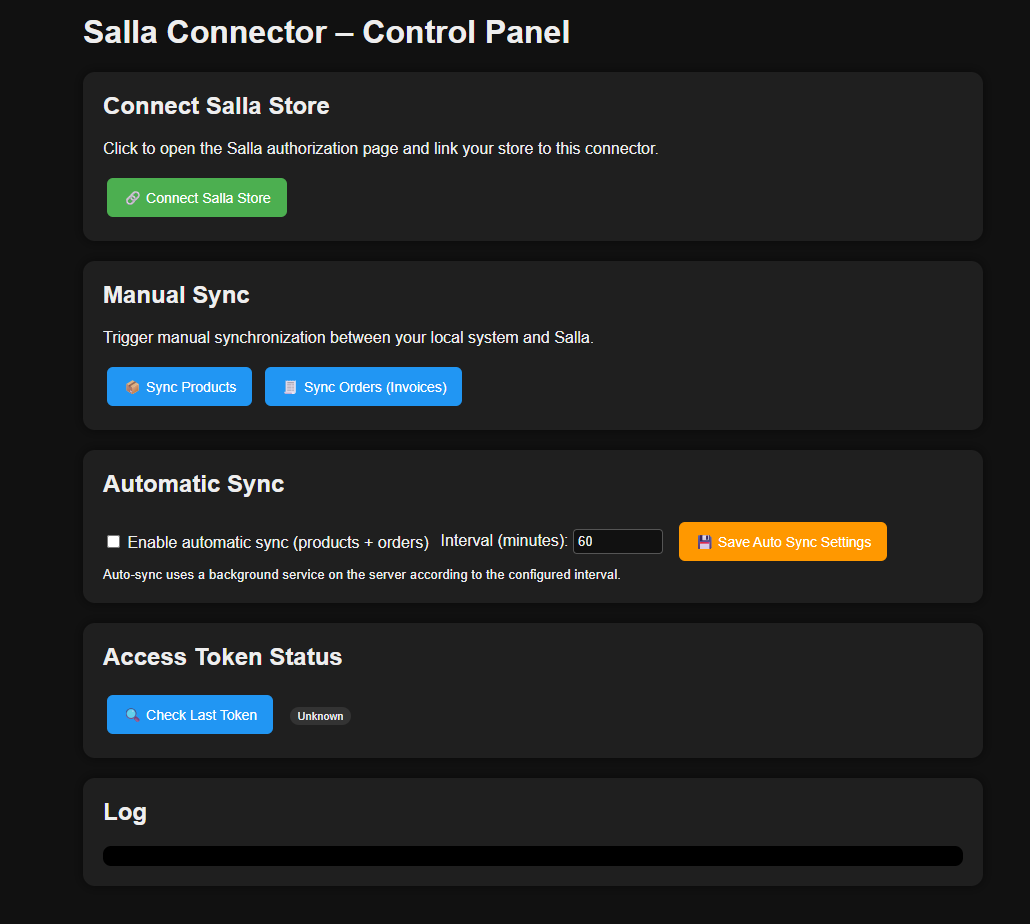
Store Connection
Connect your Salla store using the official Salla authorization screen. Access tokens are securely stored on the server side for later sync operations.
Manual Product & Order Sync
Run manual sync for products and orders to validate the integration and ensure data accuracy inside your 10Soft environment using the logs.
Automatic Sync (Auto Sync)
Enable background sync on the server with a chosen interval (in minutes), keeping inventory and sales data continuously up to date with minimal effort.
Quick start steps
- Open the URL:
https://sallaconnector.alajyaltec.com/ - Click Connect Salla Store and approve access on Salla's authorization page.
- Run manual product and order sync from the control panel and verify imported data.
- Enable Auto Sync and configure the time interval that suits your business.
- Monitor logs in the control panel for any warnings or errors during sync.